
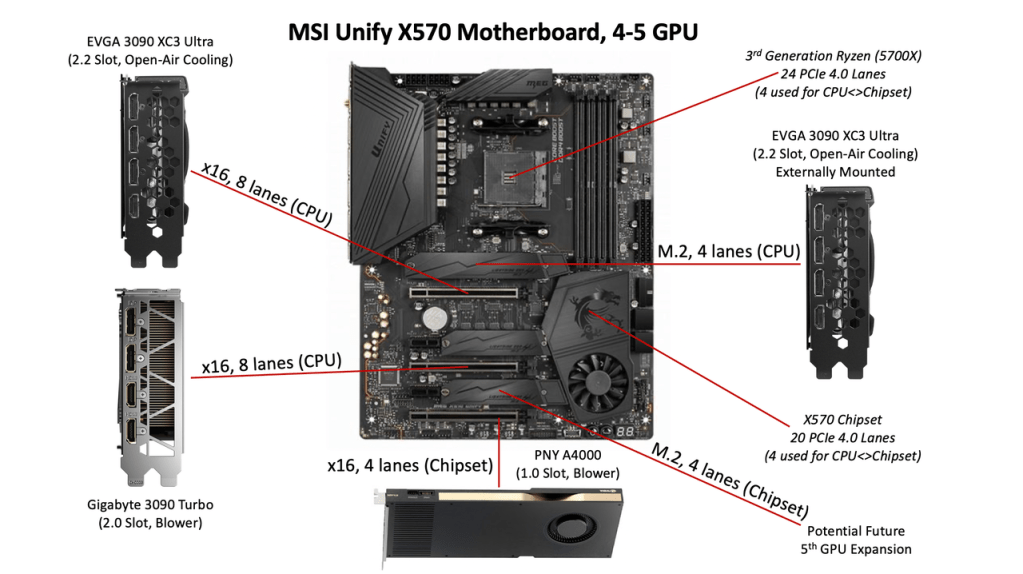
Here’s the first in a “DIY AI” series where we’ll explore practical guidance for building small-scale home, educational, and small office AI systems. This installment covers PCIe—one of the most misunderstood components in multi-GPU system design.
Whether you’re training large models, running inference pipelines, or building a workstation for AI experimentation, PCIe connectivity will have a direct impact on performance and system flexibility.
TL;DR
- The number of x16 PCIe slots on a motherboard does not indicate bandwidth or usability.
- GPU throughput is limited by both PCIe generation and lane count.
- Lane availability and allocation depend on the CPU and chipset.
- Some newer PCIe 5.0 motherboards may have fewer usable slots than older PCIe 4.0 boards, due to signal integrity and layout constraints—making certain legacy options more viable for multi-GPU builds.
PCIe Generations and Bandwidth
PCIe (Peripheral Component Interconnect Express) connects GPUs, SSDs, and other peripherals to the CPU and chipset. Each generation of PCIe offers roughly double the bandwidth of the previous one. Each slot is defined by two properties: its generation and the number of lanes (e.g., x1, x4, x8, x16).
| PCIe Gen | Per-lane Throughput (unidirectional) | x4 Slot | x8 Slot | x16 Slot |
|---|---|---|---|---|
| 3.0 | ~1 GB/s | 4 GB/s | 8 GB/s | 16 GB/s |
| 4.0 | ~2 GB/s | 8 GB/s | 16 GB/s | 32 GB/s |
| 5.0 | ~4 GB/s | 16 GB/s | 32 GB/s | 64 GB/s |
Note: These are theoretical unidirectional bandwidth maximums. Real-world performance depends on system topology, driver support, BIOS configuration, and trace layout. Bidirectional throughput doubles these numbers (e.g., PCIe 4.0 x4 = 8 GB/s up, 8 GB/s down).
PCIe Lane Allocation: CPU vs Chipset
Motherboards do not provide a uniform set of lanes across all slots. PCIe lanes are allocated by both the CPU and chipset, and the total number is limited.
For example, a Ryzen 5000-series CPU typically provides 24 PCIe 4.0 lanes:
- 16 lanes for GPUs (often split between two slots)
- 4 lanes for an NVMe SSD
- 4 lanes to connect to the chipset
An X570 chipset may provide an additional 20 PCIe 4.0 lanes, but these are accessed through the CPU–chipset link, which is limited to 4 PCIe 4.0 lanes (~8 GB/s unidirectional / ~16 GB/s bidirectional). This bottleneck can limit throughput if multiple high-bandwidth devices (such as additional GPUs or NVMe drives) are connected via the chipset.
The key distinction is this: lanes directly from the CPU provide higher and more consistent throughput than lanes routed through the chipset. Also note: not all CPUs support the latest PCIe generation—even if installed on a newer board.
Not All x16 Slots Are Equal
A common misconception is that every x16 slot on a motherboard can run a GPU at full x16 speeds. In practice, this is rarely the case. There are three primary limitations:
- Electrical lane count: A slot may be physically x16 but only electrically wired for x8, x4, or even x1.
- Shared bandwidth: Multiple slots may share a group of lanes, with bandwidth reduced when both are populated.
- Conditional availability: Some slots are disabled automatically depending on what other devices are installed (e.g., M.2 drives, SATA controllers, or expansion cards).
In some cases, a slot may appear on the board but be entirely disabled due to BIOS settings or lane conflicts. Motherboard manuals often contain detailed slot behavior tables or lane routing diagrams, which should be reviewed carefully before selecting a board for multi-GPU use.
Always check:
- How many lanes are assigned to each slot
- Whether the lanes are from the CPU or chipset
- Which devices share lanes or disable slots
- BIOS settings for lane bifurcation and slot activation
Real-World Example: MSI X570 Unify
The MSI X570 Unify is a good example of an older PCIe 4.0 motherboard with favorable layout for multi-GPU builds. A Ryzen 5700X can support two GPUs at x8 each via CPU lanes and a third GPU at x4 via the chipset.
This configuration provides three usable slots with minimal performance degradation for standard inference workloads. For specialized setups, an M.2 slot can be used with a PCIe adapter and OCuLink to connect a fourth external GPU, although this requires careful power, BIOS, and thermal planning.
GPU Workload Characteristics
The importance of PCIe bandwidth varies depending on the type of AI workload:
Inference:
- PCIe bandwidth is usually not the bottleneck.
- Models are loaded into GPU memory and executed there.
- Slower links (e.g., x4 or even x1) mainly affect model loading times.
- Large streaming or memory-swapping tasks may experience some degradation.
Training:
- Inter-GPU communication is frequent.
- Bandwidth constraints between GPUs can significantly affect performance.
- Each GPU should ideally be connected via a minimum of x8 lanes, preferably CPU-attached, although some workloads may tolerate x4.
GPU Memory Bandwidth Comparison
| GPU | PCIe Gen | Memory Bandwidth (VRAM) |
|---|---|---|
| RTX 3090 | 4.0 | 936 GB/s |
| RTX 3090 Ti | 4.0 | 1,008 GB/s |
| RTX 4090 | 4.0 | 1,008 GB/s |
Note: These are internal GPU memory bandwidth figures—not PCIe throughput. They reflect the speed of VRAM access within the GPU and are important for training and inference efficiency once models are loaded.
M.2 and OCuLink GPU Options
If additional GPUs are needed and PCIe slots are exhausted, an M.2 slot (typically x4) can be used to connect a GPU via an adapter. Two common options:
- M.2-to-PCIe x4 adapter: Connects directly to the GPU inside the case.
- M.2-to-OCuLink: Enables external GPU mounting via cable.
These setups are functional but come with trade-offs:
- Not all motherboards support GPU enumeration or boot via M.2 adapter slots.
- BIOS settings (e.g., Above 4G Decoding) may need to be enabled.
- External power delivery is required, and reliability depends on cable quality and trace layout.
- Signal degradation, limited cable length, and thermal issues are common failure points.
These should be considered experimental or advanced configurations unless validated by the motherboard manufacturer.
Power and Cooling Considerations
Multi-GPU systems are power-intensive. A single high-end GPU may require up to 450W, and two or more GPUs can easily exceed 1000W under load. Key recommendations:
- Use a power supply with sufficient wattage and the right connectors (PCIe 6+2, 12VHPWR).
- For modular PSUs, ensure you have the necessary cables—sometimes sold separately.
- Ensure proper case airflow. Blower-style GPUs are better suited for densely packed builds.
- Leave physical space between GPUs whenever possible to avoid thermal throttling.
Why Some Legacy Boards Still Make Sense
While PCIe 5.0 offers double the bandwidth of PCIe 4.0, many new motherboards offer fewer usable slots due to signal integrity requirements, stricter layout constraints, and trace length limitations. Some PCIe 4.0 boards from the previous generation provide more total usable slots, better spacing, and simpler BIOS controls for lane allocation.
For hobbyists, educators, and small office setups—especially those focused on inference or experimentation—these boards may offer better real-world value.
Final Considerations
- Always validate your GPU slot configuration in the motherboard manual before buying.
- Use CPU-connected lanes for bandwidth-critical devices like training GPUs.
- Verify BIOS support for lane bifurcation, GPU boot via adapters, and 4G decoding.
- Don’t assume a slot works just because it exists—test, validate, and plan around limitations.
Proper PCIe planning is essential for multi-GPU AI builds. It can mean the difference between a system that just runs and one that performs efficiently, predictably, and with room to scale.



 AightBits
Leave a comment