
Introduction
This post walks through a minimal but working example of the Model Context Protocol (MCP). The goal is to show how to expose a few simple database queries as MCP tools so that they can be called from an LLM interface like ChatGPT. We’ll set up a small SQLite database, create a Python server with three tools, and configure a connector so popular MCP-enabled providers and models (OpenAI ChatGPT, Anthropic Claude) can run queries against it.
First, let’s describe the three methods one can use to communicate with an MCP server:
- stdio (the original and primary method):
This is suitable when the model runs the MCP server process directly and communicates over standard input/output streams. It avoids the need for a network stack, certificates, or reverse proxies, making it ideal for local development, testing, and packaging simple tools that don’t need to be exposed outside the host machine. However, it cannot be used to connect services to LLM web interfaces like ChatGPT or Claude. - HTTP (the most common method for external access):
This is the most practical choice for real deployments and integrations. This transport runs the MCP server as a network service accessible over HTTP(S) and can expose your tools to LLM web interfaces such as ChatGPT or Claude. Because commercial providers require valid SSL certificates (and will reject self-signed ones), it typically involves running the MCP server locally and using a reverse proxy like Caddy. - HTTP streaming (for real-time bidirectional interaction):
This method extends the standard HTTP approach to support persistent, low-latency streams between the client and server. It is most useful in situations where responses don’t have to wait for a request to fully complete. Streaming is useful when tools produce incremental results or when interactivity matters, such as monitoring live data feeds or responding continuously as events occur, but is not covered here.
For this example we’ll use method 2, and specifically FastMCP: A lightweight Python library that makes it easier to build Model Context Protocol servers. Instead of having to write all the boilerplate to handle JSON-RPC messages and protocol details, FastMCP offers a clean, simple-to-use API where any Python function can become a tool that’s instantly available via MCP.
In short, FastMCP takes care of the wiring (transports, request/response handling, and JSON conversion) so we can focus on the logic.
Important considerations:
- FastMCP is suitable for demos, prototypes, and small projects, but larger and more secure production systems will need better control, security, and scalability.
- This is not secure or production-ready code. Production implementations should, at the very least:
- mplement OAuth authorization.
- Protect against SQL injection and other exploits.
- Employ additional protections like rate-limiting.
- Consider performance and scaling issues.
1. Prerequisites
- A registered domain name with DNS entries pointing to server.
- A valid SSL certificate for the domain name (not self-signed).
- Publicly accessible 443 port redirecting to local port 8000.
For this example, I use Caddy to obtain an SSL certificate for our registered domain name and redirect from port https port 443 to local port 8000 all in one simple configuration:
my.domain.com {
  handle /mcp* {
    reverse_proxy 127.0.0.1:8000
  }
}
2. Code and Sample Data
First, let’s create some data to work with:
init_demo_db.py:
import sqlite3

DB_PATH = "demo.db"

def main():
    con = sqlite3.connect(DB_PATH)
    cur = con.cursor()

    cur.execute("DROP TABLE IF EXISTS orders;")
    cur.execute("DROP TABLE IF EXISTS customers;")

    cur.execute("""
    CREATE TABLE customers (
        id INTEGER PRIMARY KEY,
        name TEXT NOT NULL,
        email TEXT NOT NULL
    );
    """)

    cur.execute("""
    CREATE TABLE orders (
        id INTEGER PRIMARY KEY,
        customer_id INTEGER NOT NULL,
        product TEXT NOT NULL,
        amount REAL NOT NULL,
        order_date TEXT NOT NULL,
        FOREIGN KEY (customer_id) REFERENCES customers(id)
    );
    """)

    cur.executemany(
        "INSERT INTO customers (id, name, email) VALUES (?, ?, ?);",
        [
            (1, "Alice Johnson", "alice@example.com"),
            (2, "Bob Smith", "bob@example.com"),
            (3, "Charlie Lee", "charlie@example.com"),
        ],
    )
    cur.executemany(
        "INSERT INTO orders (id, customer_id, product, amount, order_date) VALUES (?, ?, ?, ?, ?);",
        [
            (1, 1, "Laptop", 1200.00, "2025-09-01"),
            (2, 1, "Mouse", 25.50, "2025-09-02"),
            (3, 2, "Keyboard", 75.00, "2025-09-03"),
            (4, 3, "Monitor", 300.00, "2025-09-05"),
            (5, 2, "Headset", 55.00, "2025-09-06"),
        ],
    )

    con.commit()
    con.close()
    print(f"Initialized {DB_PATH}")

if __name__ == "__main__":
    main()
Running this code will create our demo database:
~/dev/mcp_example$ python init_demo_db.py
Initialized demo.db

~/dev/mcp_example$ ls -al demo.db
-rw-r--r-- 1 dave dave 12288 Oct  3 09:11 demo.db
Now our example MCP server below has data to work with:
mcp_server_example.py:
import sqlite3, json, re
from typing import Any, Dict, List, Optional

from fastmcp import FastMCP

DB_PATH = "demo.db"
mcp = FastMCP("mcp_server_example")

def query(sql: str, params: tuple = ()) -> List[Dict[str, Any]]:
    con = sqlite3.connect(DB_PATH)
    con.row_factory = sqlite3.Row
    cur = con.cursor()
    cur.execute(sql, params)
    rows = [dict(r) for r in cur.fetchall()]
    con.close()
    return rows

SELECT_ONLY = re.compile(r"^\s*select\b", re.IGNORECASE | re.DOTALL)

@mcp.tool()
def get_customer(customer_id: int) -> str:
    """Fetch a single customer by id."""
    data = query("SELECT id, name, email FROM customers WHERE id = ?", (int(customer_id),))
    return json.dumps(data[0] if data else {}, indent=2)

@mcp.tool()
def list_orders(customer_id: Optional[int] = None, min_amount: Optional[float] = None) -> str:
    """List orders (optional filters: customer_id, min_amount)."""
    sql = "SELECT id, customer_id, product, amount, order_date FROM orders WHERE 1=1"
    params: List[Any] = []
    if customer_id is not None:
        sql += " AND customer_id = ?"
        params.append(int(customer_id))
    if min_amount is not None:
        sql += " AND amount >= ?"
        params.append(float(min_amount))
    sql += " ORDER BY order_date, id"
    return json.dumps(query(sql, tuple(params)), indent=2)

@mcp.tool()
def sql_select(sql: str) -> str:
    """Run a SELECT-only SQL query against demo.db."""
    if not SELECT_ONLY.match(sql):
        return json.dumps({"error": "Only SELECT statements are allowed."}, indent=2)
    return json.dumps(query(sql), indent=2)

if __name__ == "__main__":
    mcp.run(transport="http", host="127.0.0.1", port=8000)
3. Starting the Server
With the database created and the application written, let’s start the server:

4. Creating the Connector
Now that we have configured our server, we can go to ChatGPT, turn on developer mode, and create the connector:
1. Go to Settings->Connectors->Advanced settings and enable Developer mode.

2. Go to Settings->Connectors and select the Create.

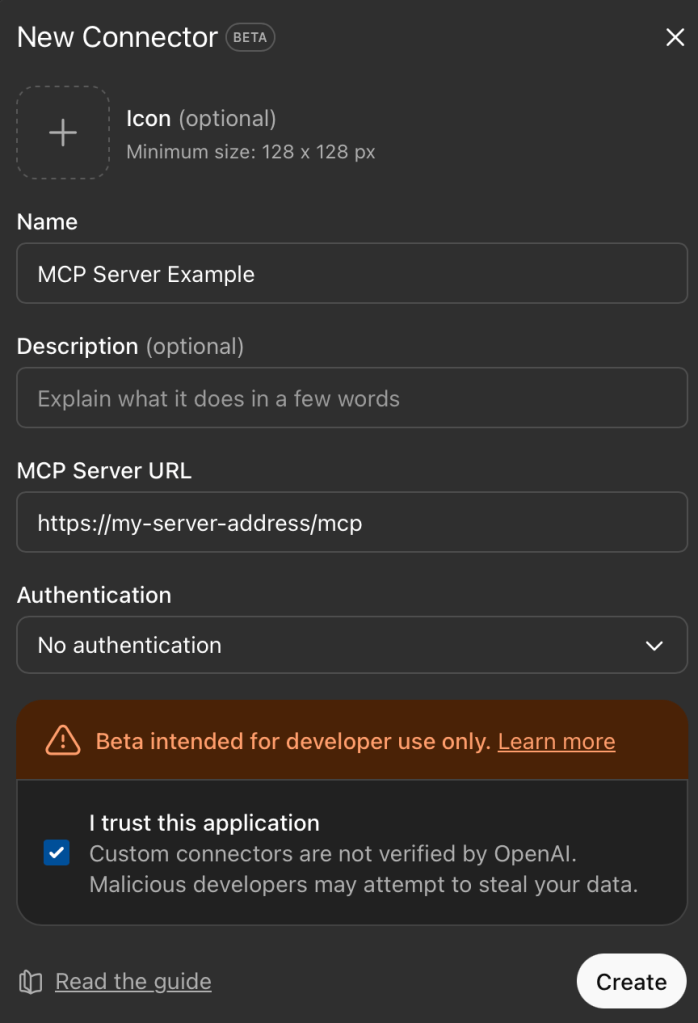
3. Configure the connector (assumes 1. https port is open on firewall, 2) Caddy or similar server/proxy is redirecting to local port 8000, and 3) a valid SSL certificate for the domain name used):
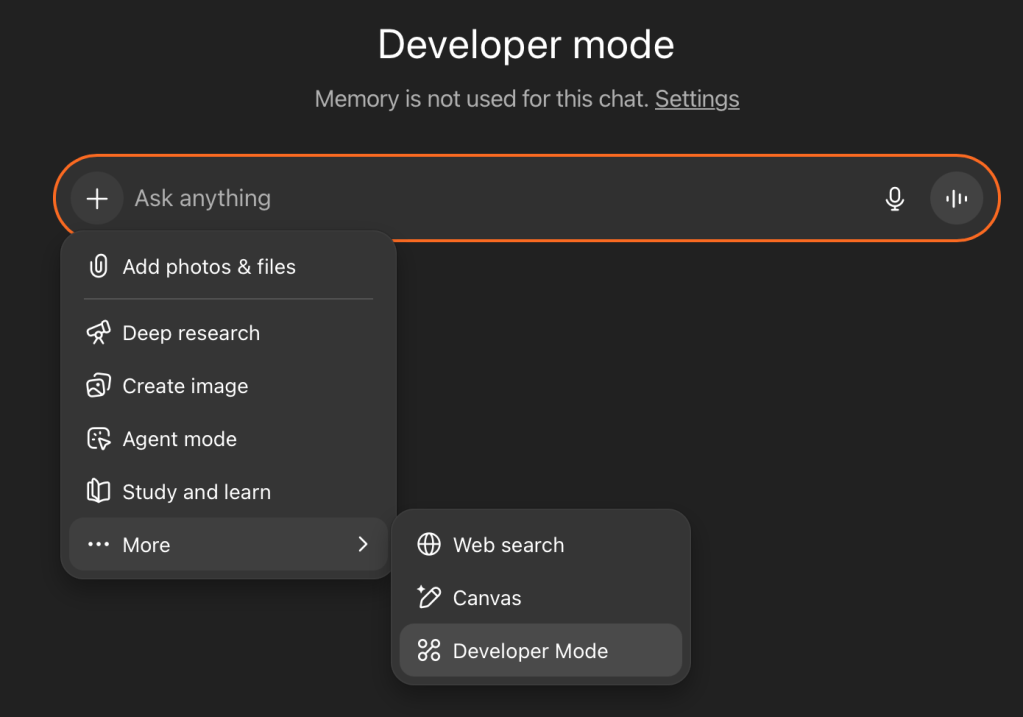
4. Start a new session, select +, then … More, and then Developer mode to activate.
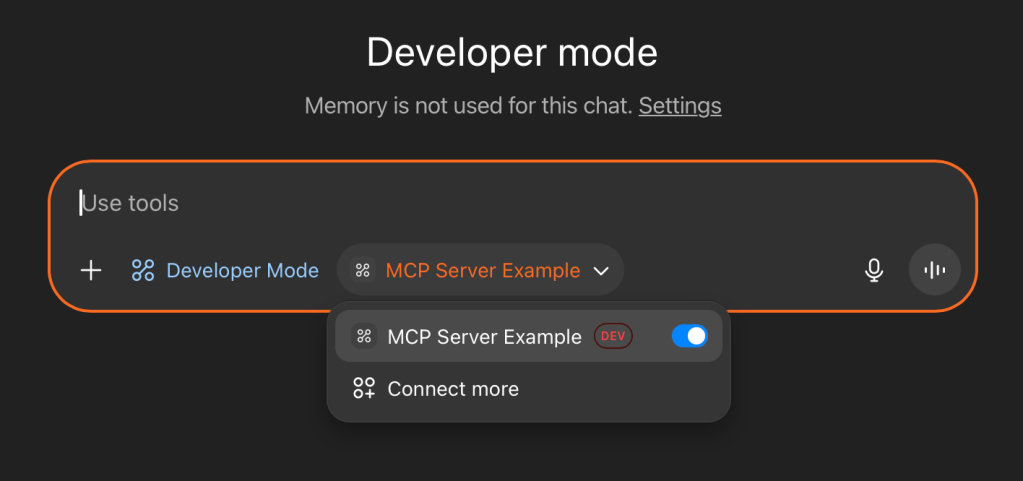
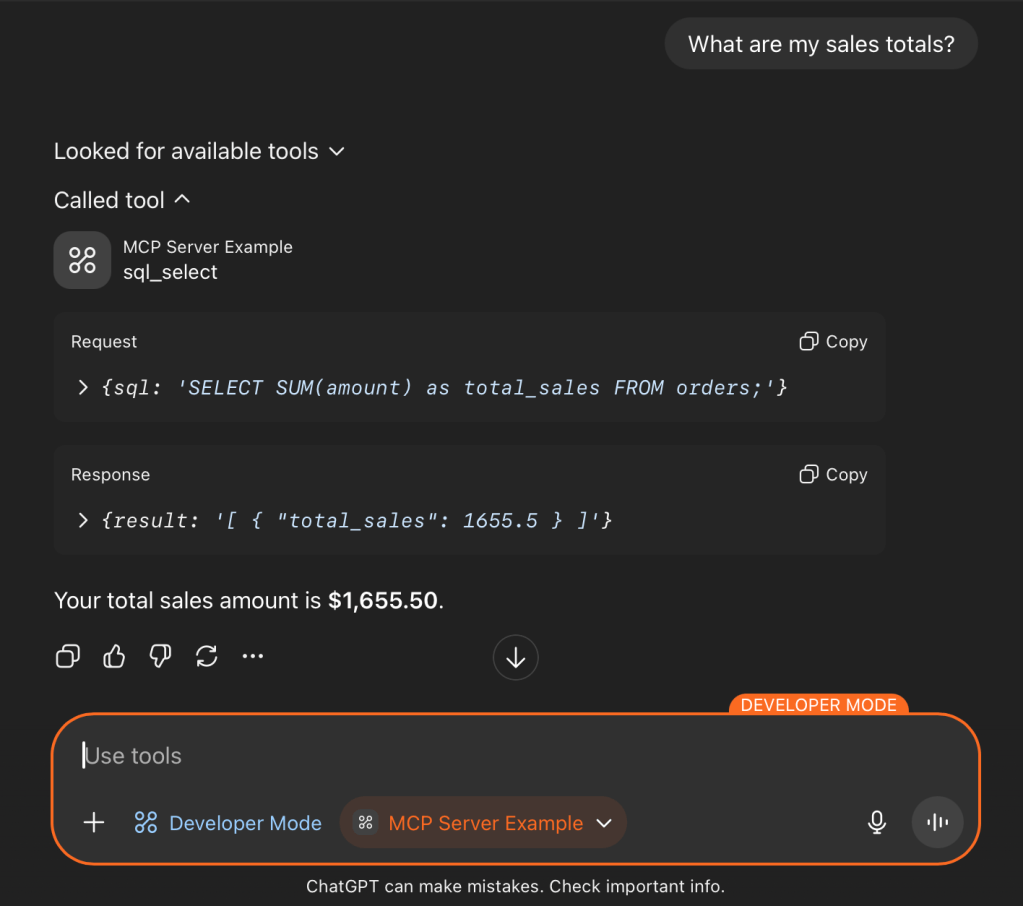
5. Test the connection with a prompt. You will have to approve access to the MCP service, but can choose to remember this approval throughout the session.

5. Extended Example
Below are some examples of how the LLM can interpret natural language to call the defined functions of the MCP server, and even generate SQL code as necessary:

Conclusion
MCP provides a common way to let language models call out to external code. The interface is simple:
- Define a tool
- Describe its arguments
- Return a result.
That same pattern works whether the tool wraps a database query, a script, or a production service. The example here is small, but the point is that the approach doesn’t change as the system grows more complex. MCP’s usefulness comes from being predictable and repeatable across different environments.



 AightBits
Leave a comment