
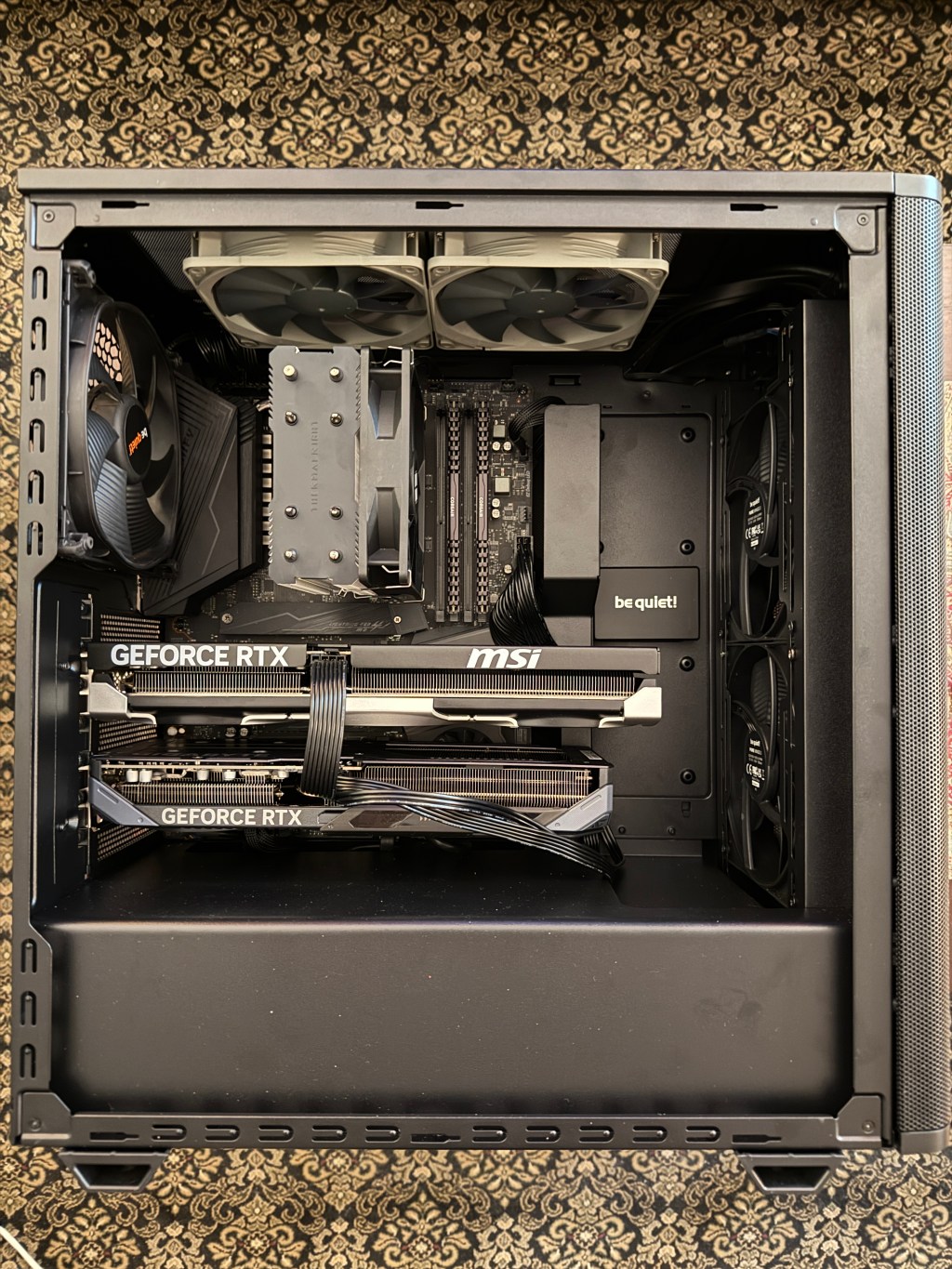
A few years back, I wrote about one of my “high-end consumer” LLM inference workstation builds. Utilizing all new PC hardware along with five used NVIDIA RTX 3090 24GB Ampere GPUs (120GB total VRAM) and 128GB system RAM, this beast was my second most powerful system at the time and remains an important workhorse to this day.
However, times have changed. Current higher-end hardware has become much more expensive and even difficult to source. So today, we’ll explore the opposite end of the spectrum: An LLM inference workstation for only US$1,200 using budget components.
There’s a lot going on here. We may be aiming for inexpensive, but you’ll soon see that new features of even the lower-end, latest generation consumer NVIDIA GPUs can be competitive for small workloads and introduce more flexibility than the Ada and Ampere generations that precede them.
Caveats
GPU selection (why AMD was not considered for this particular build):
- AMD ROCm support is growing but still hasn’t reached the maturity and availability of NVIDIA CUDA-based tools.
- Current consumer AMD GPUs (except the RX 9070 XT) do not support FP8, requiring reliance on less precise INT8 quantization for GPUs with low VRAM.
- A 24GB AMD GPU (several hundred dollars more) would be needed to run models in FP16 and achieve similar precision to FP8, which Blackwell supports.
- The 16GB RX 9070 XT does support FP8 and has a wider memory bus (256-bit compared to the 5060 Ti’s 128-bit) but lacks FP4, is pricier, and is less supported.
Model selection (why Llama 3.1 8b Instruct & Qwen 3 14B were used for testing):
- I chose these two models to compare FP8 and FP4 models to their FP16/BF16 and INT8 counterparts:
- RedHatAI/Meta-Llama-3.1-8B-Instruct-FP8 @ 32K max context
- RedHatAI/Qwen3-14B-NVFP4 @ 16K max context
- The following models were also considered, tested to function as expected, and are all viable options for 5060 Ti builds:
- ibm-granite/granite-3.3-8b-instruct-FP8 @ 32K max context
- RedHatAI/Mistral-7B-Instruct-v0.3-FP8 @ 32K max context
- nvidia/Qwen3-8B-FP8 @ 32K max context
- RedHatAI/Phi-4-mini-instruct-FP8-dynamic @ 64K max context
- nvidia/NVIDIA-Nemotron-Nano-12B-v2-VL-NVFP4-QAD @ 24K max context
- nvidia/NVIDIA-Nemotron-Nano-9B-v2-FP8 @ 128K max context
- openai/gpt-oss-20b (mxfp4) did load successfully with 16K context but has not been thoroughly tested and should be considered experimental
Tested vLLM settings for all models provided in addendum below.
Focus on precision:
You will see a lot of emphasis on precision and cautions concerning INT8 quantization of smaller models. This is because:
- Smaller models are impacted more heavily by quantization.
- Errors from increased perplexity compound more profoundly over long context (drift), particularly with schemes like RoPE.
Use Cases
First, we need to set expectations: This build is best suited for light use due to limited model and context sizes, with some form of RAG recommended to offset these limitations. This includes:
- Light development:
- Inference tools and small applications
- Proof-of-Concept and prototyping
- Testing
- Demos
- Basic LLM tasks:
- Summarization
- Classification
- Translation
- Sentiment Analysis
- Named Entity Recognition
- Unstructured to structured data conversion
- Learning and experimentation
While larger models can be loaded using heavily quantized models and/or by utilizing CPU and system RAM (e.g., using llama.cpp/gguf), significant impacts to performance and precision may be problematic.
The Build
I’ll be repurposing a previous system built around an NVIDIA RTX 4000 (16GB Ampere) and simply upgrading the GPU. All prices are US, are at time of original purchase, and include any sales tax and shipping paid:
| MSI PRO B550M-VC WiFi ProSeries Motherboard | $130.04 |
| AMD Ryzen 5 5600X 6C/12T CPU w/ Wraith Stealth Cooler | $135.47 |
| Corsair VENGEANCE LPX DDR4 64GB (2x32GB) 3200MHz CL16 | $120.29 |
| Samsung 970 EVO Plus 1TB NVMe SSD | $91.02 |
| MSI Gaming RTX 5060 Ti (Blackwell, 16GB VRAM) | $487.68 |
| Thermaltake Versa H17 Black SPCC Micro ATX Mini Tower | $54.18 |
| Thermaltake GF1 Modular ATX 850W Power Supply (80 Plus Gold) | $102.95 |
| Noctua NF-P12 redux-1700 PWM 4-Pin 1700 RPM 120mm Fans | $34.57 |
| $1,156.20 |
As you’ll see below, the move from workstation NVIDIA RTX 4000 GPU to the 5060 Ti isn’t just about speed or throughput, but the very important addition of FP8 support, which increases performance and accuracy while decreasing TDP and model memory footprints.

Notes:
- If you find a deal on newer hardware, especially hardware that supports DDR5 and PCIe 5.0, that would be even better.
- Or, you can find often find great deals on old stock/used AM4/PCIe 4.0 hardware.
- In some cases, like many SLI-compatible X570 AM4/PCIe 4.0 motherboards, you may be able to use two physical x16 slots, allowing for two 16GB Blackwell GPUs for a total of 32GB VRAM using tensor and/or pipeline parallelism.
- If you plan to quantize your own models to FP8 using tools like llm-compressor, make sure you have enough RAM to hold the entire FP16 model. 64GB should be sufficient for any model that can actually run entirely on a single 5060 Ti.
The Benchmarks
- Comparing:
- NVIDIA 3090 24GB and 5060 Ti 16GB
- 8B and 14B models
- FP16 / INT8 / FP8 / FP4
Meta AI Llama 3.1 8B Instruct
First, I benchmarked each server twice (native FP16/8 and bitsandbytes INT8 quantization on load for each GPU).
- Models:
- meta-llama/Llama-3.1-8B-Instruct (FP16, BNB)
- RedHatAI/Meta-Llama-3.1-8B-Instruct-FP8 (FP8)
- Software:
- Server: vLLM 0.11.2
- OS: Ubuntu Server 24.04.3 LTS (headless, for maximum VRAM availability)
- Installed NVIDIA driver: 580.105.08 (open)
- Installed CUDA version: 13.0
- Benchmark tools:
- Performance: custom
- Perplexity: lm-eval
- Test prompts:
- Long prompt: “Summarize the following text: [first two parts of Thomas Paine’s The Crisis]” (approximately 13K input tokens]
- Short prompt: “Write a 1,000 word story about AI.” (approximately 1K output tokens)
| 3090 FP16 | 5060 Ti FP8 | 3090 INT8 | 5060 Ti INT8 | |
|---|---|---|---|---|
| Architecture | Ampere | Blackwell | Ampere | Blackwell |
| VRAM | 24 GB | 16 GB | 24 GB | 16 GB |
| TDP | 350W | 180W | 350W | 180W |
| Precision Supported | FP16, BF16, INT8 | FP4, FP6, FP8, FP16, INT8 | FP16, BF16, INT8 | FP4, FP6, FP8, FP16, INT8 |
| Precision Used | FP16 (W16A16) | FP8 (W8A16) | INT8 (BNB W8A16) | INT8 (BNB W8A16) |
| Perplexity | 11.6280 (Baseline) | 11.6799 (+0.05%) | 12.2505 (+5.4%) | 12.2484 (+5.3%) |
| Max Concurrency | 1.29x | 1.03x | 3.58x | 1.80x |
| VRAM Used | 21,136 MiB | 14,940 MiB | 23,120 MiB | 13,738 MiB |
| TTFT, (Sum-marization) | 3.78 seconds | 3.5 seconds | 4.1 seconds | 6.1 seconds |
| Speed (Sum-marization) | 45.3 toks/sec | 35.4 toks/sec | 78.22 toks/sec | 46.9 toks/sec |
| TTFT (Text Generation) | < 1 second | < 1 second | < 1 second | < 1 second |
| Speed (Text Generation) | 50.0 toks/sec | 29.0 toks/sec | 93.8 toks/sec | 57.8 toks/sec |
What really stands out:
- The entry-level 5060 Ti 16GB, with its native FP8 support, provides near-FP16 accuracy with approximately 80-85% performance of the 3090 24GB (at FP16), and does so at just over half the TDP.
- INT8 is significantly faster and allows for higher concurrency, but with increased perplexity that can cause accuracy issues, especially with higher contexts.
- For a single user and one concurrent session, a 5070 Ti or 5080 (each with 16GB and a wider memory bus) is likely to be faster than the 3090.
Alibaba Qwen 3 14B
Here we are going to stretch the limits even further, comparing FP16 (requiring two 3090s with a total capacity of 48GB) to BNB INT8 (on a single 3090 with 24GB) and FP4 (on a single 5060 TI with 16GB).
- Models:
- Qwen/Qwen3-14B (FP16, BNB)
- RedHatAI/Qwen3-14B-NVFP4 (FP4)
| 2×3090 FP16 (TP) | Single 3090 INT8 | 5060 Ti FP4 | |
|---|---|---|---|
| Architecture | Ampere | Ampere | Blackwell |
| VRAM | 48 GB | 24 GB | 16 GB |
| TDP | 700W | 350W | 180W |
| Precision Supported | FP16, BF16, INT8 | FP16, BF16, INT8 | FP4, FP6, FP8, FP16, INT8 |
| Precision Used | FP16 (W16A16) | INT8 (BNB W8A16) | FP4 (NVFP4) |
| Perplexity | 14.4009 (Baseline) | 14.8669 (+3.2%) | 15.2651 (+6.0%) |
| Max Concurrency | 5.64x | 4.32x | 1.45x |
| VRAM Used | 44,548 MiB | 22,656 MiB | 15,182 MiB |
| Time to 1st Token (Summarization) | 3.6 seconds | 6.8 seconds | 3.4 seconds |
| Generation Speed (Summarization) | 46.3 tokens/sec | 48.9 tokens/sec | 30.1 tokens/sec |
| Time to 1st Token (Text Generation) | < 1 second | < 1 second | < 1 second |
| Generation Speed (Text Generation) | 50.4 tokens/sec | 55.9 tokens/sec | 35.41 tokens/sec |
Note that we consider the first token to include “reasoning” tokens, if generated.
- The fact a 16GB 5060 Ti can run a 14B model @ 16K context with a 6.2% perplexity loss from the FP16 baseline is impressive.
- However, a single 24GB 3090 using INT8 (BNB W8A16) is clearly advantageous over the 5060 Ti’s native FP4 in terms of accuracy, speed, and concurrent sessions.
- Even older Ampere GPUs may be feasible when comparing speed and accuracy of INT8 vs FP4, and the best choice here really depends on use case.
Considerations for Future Upgrades
With the right consumer motherboard (including many older SLI-compatible AM4 X570 models), one could even use two 5060 Ti 16GB at x8/x8 lanes for a total of 32GB VRAM by utilizing tensor and/or pipeline parallelism** — and at half the price and well under the 575W TDP of a single 5090* 32GB GPU.
* A single 5090 still provides higher performance without the complexity or compatibility issues from requiring tensor/pipeline parallelism.
** TP/PP is supported by most text generation models but not by most image generation models. Also, SLI x8/x8, particularly falling back to PCIe 4.0, will introduce additional performance issues over the 5060 Ti’s bottlenecked 128-bit bus.
Conclusion
The goal here wasn’t performance: With only 16GB, only the smallest models and 1-2 concurrent users are feasible. Higher speed generation just isn’t worth the premium cost for most small LLM workloads.
Rather, this is about exploration and development, not production applications. A 5070 Ti or 5080 would be considerable faster, especially given the wider memory bus, but not generally worth the price considering model/concurrency limits.
We also demonstrate that by sacrificing accuracy, we CAN get higher performance and more concurrent users with legacy hardware, but that performance comes with a cost to accuracy and precision that can hit hard, especially with long contexts.
One must carefully balance performance and precision working with small models and quantization, but these can still be valuable learning tools and development systems.
Addendums
Future planned post updates:
- 4090 comparison (FP16/INT8, FP8 h/w support but s/w support may be limited)
- Mac M4 Pro comparison (FP16/INT8 only — no FP8)
vLLM settings tested:
- RedHatAI/Meta-Llama-3.1-8B-Instruct-FP8
- vllm serve ~/models/nvidia_Llama-3.1-8B-Instruct-FP8 \
–max-model-len 32768 \
–max-num-seqs 1
- vllm serve ~/models/nvidia_Llama-3.1-8B-Instruct-FP8 \
- RedHatAI/Qwen3-14B-NVFP4
- vllm serve ~/models/RedHatAI_Qwen3-14B-NVFP4 \
–max-model-len 16384 \
–max-num-seqs 1 \
–reasoning-parser qwen3 \
–chat-template \
./qwen3.jinja
- vllm serve ~/models/RedHatAI_Qwen3-14B-NVFP4 \
- ibm-granite/granite-3.3-8b-instruct-FP8
- vllm serve ~/models/ibm-granite_granite-3.3-8b-instruct-FP8 \
–max-model-len 32768 \
–max-num-seqs 1
- vllm serve ~/models/ibm-granite_granite-3.3-8b-instruct-FP8 \
- RedHatAI/Mistral-7B-Instruct-v0.3-FP8
- vllm serve ~/models/RedHatAI_Mistral-7B-Instruct-v0.3-FP8 \
–max-model-len 32768 \
–max-num-seqs 1
- vllm serve ~/models/RedHatAI_Mistral-7B-Instruct-v0.3-FP8 \
- nvidia/Qwen3-8B-FP8
- vllm serve ~/models/nvidia_Qwen3-8B-FP8 \
–max-model-len 32768 \
–max-num-seqs 1 \
–reasoning-parser qwen3 \
–chat-template ./qwen3.jinja
- vllm serve ~/models/nvidia_Qwen3-8B-FP8 \
- RedHatAI/Phi-4-mini-instruct-FP8-dynamic
- vllm serve ~/models/RedHatAI_Phi-4-mini-instruct-FP8-dynamic \
–max-model-len 65536 \
–max-num-seqs 1
- vllm serve ~/models/RedHatAI_Phi-4-mini-instruct-FP8-dynamic \
- nvidia/NVIDIA-Nemotron-Nano-12B-v2-VL-NVFP4-QAD
- vllm serve ~/models/nvidia_NVIDIA-Nemotron-Nano-12B-v2-VL-NVFP4-QAD \
–max-model-len 24576 \
–max-num-seqs 1 \
–quantization modelopt_fp4 \
–video-pruning-rate 0 \
–trust-remote-code \
–chat-template nemotronvl.jinja
- vllm serve ~/models/nvidia_NVIDIA-Nemotron-Nano-12B-v2-VL-NVFP4-QAD \
- nvidia/NVIDIA-Nemotron-Nano-9B-v2-FP8
- vllm serve ~/models/nvidia_NVIDIA-Nemotron-Nano-9B-v2-FP8 \
–max-model-len 131072 \
–mamba_ssm_cache_dtype float32 \
–trust-remote-code \
–max-num-seqs 1
- vllm serve ~/models/nvidia_NVIDIA-Nemotron-Nano-9B-v2-FP8 \
- openai/gpt-oss-20b
- vllm serve ~/models/openai_gpt-oss-20 \
–max-model-len 16384 \
–max-num-seqs 1 \
–gpu-memory-utilization 0.94
- vllm serve ~/models/openai_gpt-oss-20 \
1/12/2026 Update
Needed more VRAM for a new project but still managed to make it under US$2,000 by reusing DDR4 RAM and NVMe storage I already in stock. I also had to purchase the motherboard and CPU used. All prices include sales tax and shipping.
| MSI Meg X570 Unify ATX Motherboard (used) | $ 285.62 | 1/3/26 |
| Ryzen 7 5700X 8C/16T 3.4GHz CPU | $ 189.65 | 1/3/26 |
| Thermalright Assassin X120 Refined SE CPU Air Cooler | $ 19.39 | 1/3/26 |
| Corsair VENGEANCE LPX DDR4 64GB (2x32GB) 3200MHz CL16 | $ 120.29 | 11/26/23 |
| Samsung 990 Pro 2TB NVMe SSD | $ 140.88 | 11/6/23 |
| MSI Gaming RTX 5060 Ti (Blackwell, 16GB VRAM) | $ 487.68 | 11/21/25 |
| GIGABYTE GeForce RTX 5060 Ti Gaming OC 16G | $ 509.35 | 1/3/26 |
| be quiet! Pure Base 501 ATX Case w/ 2 Pure Wings 3 140mm PWM Fans | $ 108.27 | 1/3/26 |
| be quiet! Silent Wings 3 140mm PWM | $ 24.81 | 11/26/22 |
| 2 x Noctua NF-P12 redux-1700 PWM 120mm Fan | $ 34.57 | 1/3/26 |
| Thermaltake Toughpower GT 1000W Power Supply | $ 130.04 | 1/3/26 |
| $ 2,050.55 |
This setup doubles VRAM to 32GB for 1/3 to 1/4 the price of a single 5090, using about 1/2 the power. I decided to spring for a larger power supply (1000W) to allow for future upgrades.
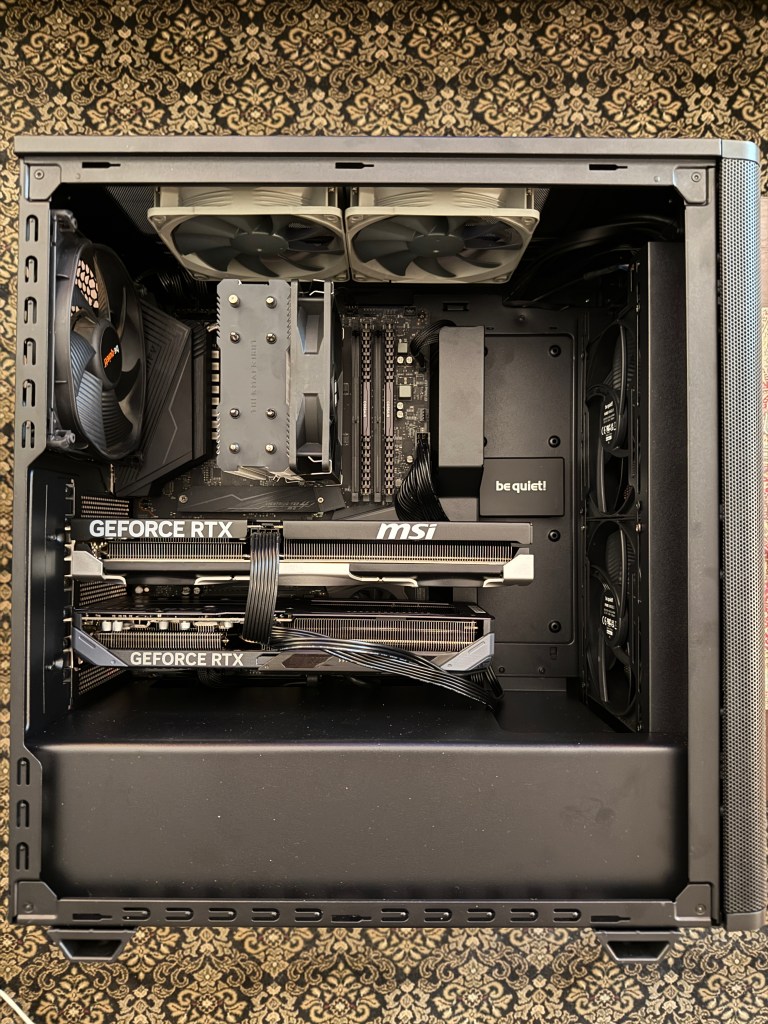
So what does the addition 5060 Ti get us, really? Comparing gpt-oss-20b, we get:
- Larger context and higher concurrency (65,536/5 or 32,768/10 vs 16,384/3)
- Faster summarization (~118 tokens/sec vs ~80 tokens/sec)
- Faster zero-shot generation (~137 tokens/sec vs ~92 tokens/sec)
Tested settings:
vllm serve ~/models/openai_gpt-oss-20b \--tensor-parallel-size 2 \--max-model-len 65536 \--max-num-seqs 5 \--gpu-memory-utilization 0.75
vllm serve ~/models/openai_gpt-oss-20b \--tensor-parallel-size 2 \--max-model-len 32768 \--max-num-seqs 10 \--gpu-memory-utilization 0.75
In terms of cost, I did cheat a bit and used RAM and storage I already had, but if I had to build this from scratch with today’s prices I’d likely choose:
- G.SKILL RipjawsV Series DDR4 32GB (2x16GB) 3200MT/s CL16 ($260.09)
- Crucial 1TB P310 PCIe 4.0 x4 M.2 Internal SSD ($115.95)
This would bring the build up to $2,165.42. That’s still a complete 32GB VRAM dual GPU LLM workstation for half the price of just a 32GB 5090 GPU at current scalper pricing.


 AightBits
Leave a comment